Film Curve
The Film Curve module is a Weibull parametric scene-to-display transform that emulates how photographic film responds to light. It is fundamentally different from a simple tone curve — it models the nonlinear chemical response of film emulsion, including highlight rolloff, shadow toe, and hue-preserving color reconstruction.
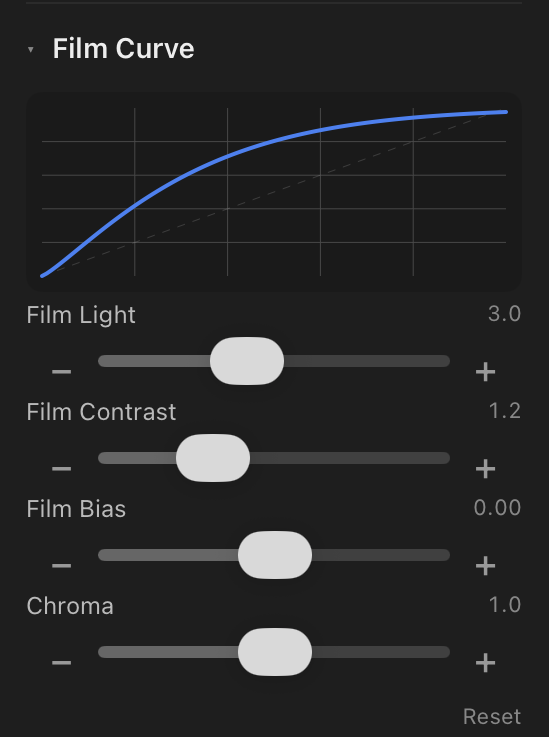
Controls
| Parameter | Range | Default | Effect |
|---|---|---|---|
| Film Light | 1 – 6 | 3.0 | Overall brightness mapping. Higher values produce a brighter image with more headroom in highlights. |
| Film Contrast | 0.5 – 3 | 1.2 | Steepness of the curve. Higher values increase the separation between shadows and highlights. |
| Film Bias | -1 – 1 | 0 | Shadow/highlight balance. Positive shifts the curve toward highlights (brighter midtones); negative shifts toward shadows. |
| Chroma | 0 – 2 | 1.0 | Color saturation preservation during the tone mapping. Higher values maintain more color in highlights. |
How It Works
Traditional tone curves are arbitrary splines — the photographer draws a shape, and the software interpolates between control points. Film curves are different: they model a physical process.
The Weibull function produces the characteristic "S-curve" shape of film naturally:
- Toe region (shadows) — a gentle, gradual rise that prevents harsh clipping in dark areas
- Linear region (midtones) — a proportional response that preserves tonal relationships
- Shoulder region (highlights) — a smooth rolloff that compresses bright values gracefully instead of clipping
The filmcurv module processes colors in a perceptually uniform color space (DT UCS or similar) to preserve hue during the tonal compression. A simple RGB tone curve shifts hues as it compresses — bright reds become orange, bright blues become purple. The film curve avoids this by mapping in a hue-preserving space.
Curve Preview
The small graph at the top of the Film Curve section shows the current response curve in real time. The horizontal axis is input luminance (scene values), and the vertical axis is output luminance (display values). As you adjust the four parameters, the curve updates immediately, showing the exact shape of the tone mapping.
When to Use Film Curve
- Shooting RAW and want a film-like rendering without baking it in-camera
- Recovering highlights in high-contrast scenes (weddings, outdoor portraits)
- Achieving a specific film stock look without using a LUT
- Fine-tuning the "feel" of an image beyond what exposure and contrast sliders offer